Troubleshooting
Start with the distributed prerequisite checker and the CLI/IDE output. Preserve the first stable error identifier and exit code; later messages can be consequences of the first failure.
Symptom index
| Symptom | Start here |
|---|---|
| Java, OpenGrep, IDE, or container not ready | Run diagnostics |
PowerShell blocks .ps1 prerequisite checker |
PowerShell blocks the prerequisite checker |
License error [...] or exit 3 |
License failures |
| OpenGrep command not found | OpenGrep is not found |
| Edge, SmartScreen, or Defender blocks OpenGrep download | OpenGrep download is blocked by Microsoft Edge, SmartScreen, or Defender |
| Scan appears stuck or quiet | Scan appears quiet |
| Empty or unexpectedly small report | Reports are empty |
| Docker/Podman mount or permission failure | Container volumes fail |
| IDE report panel is blank | IDE report does not open |
| Viewer does not recognize files | Viewer cannot load reports |
Run diagnostics first
.\postq-code-scanner-preinstall-check.ps1
bash ./postq-code-scanner-preinstall-check.sh
For container-only usage, select the container profile. For CLI and IDE usage, select runtime.
Run diagnostics as the same account that runs the scanner.
If Windows PowerShell blocks the .ps1 checker, use the temporary process-only bypass in
PowerShell blocks the prerequisite checker. If
OpenGrep cannot be downloaded or is removed by Microsoft Edge, SmartScreen, or Windows Defender,
use OpenGrep download is blocked by Microsoft Edge, SmartScreen, or Defender.
PowerShell blocks the prerequisite checker
PowerShell may block postq-code-scanner-preinstall-check.ps1 because of the machine's
execution-policy settings. You can run the checker without permanently weakening the machine
policy.
The safest temporary option is to allow scripts only in the current PowerShell window:
Set-ExecutionPolicy -Scope Process -ExecutionPolicy Bypass
Answer Y if prompted, then run the checker:
.\postq-code-scanner-preinstall-check.ps1
For a product-specific check, add the profile used by the quick-start page:
.\postq-code-scanner-preinstall-check.ps1 -Profile runtime
.\postq-code-scanner-preinstall-check.ps1 -Profile vscode
.\postq-code-scanner-preinstall-check.ps1 -Profile eclipse
.\postq-code-scanner-preinstall-check.ps1 -Profile container
If the ZIP or script was downloaded from the internet, Windows may also mark the script as blocked. In that case, unblock only the copied checker file and run it again:
Unblock-File .\postq-code-scanner-preinstall-check.ps1
.\postq-code-scanner-preinstall-check.ps1
Use Unblock-File only after confirming the file came from the PostQ release artifact you intended
to run. Do not change LocalMachine execution policy just to run the prerequisite checker.
License failures
Run status without scanning:
postq-code-scanner-cli --license-file /secure/postq.lic --license-status
Check, in order:
- The file exists and the scan account can read it.
- The file was not edited, reformatted, truncated, or pasted through a lossy system.
- Host UTC time and time synchronization are correct.
- The signed license and beta windows are active.
- Repository and eligible-file limits are not exceeded.
- The local ledger exists, is writable, and has not been modified or rolled back.
Do not attach postq.lic or the ledger to an unprotected support request.
OpenGrep is not found
Verify:
opengrep --version
Set an explicit command:
export POSTQ_OPENGREP_PATH=/usr/local/bin/opengrep
$env:POSTQ_OPENGREP_PATH = 'C:\Tools\OpenGrep\opengrep.exe'
Or pass --opengrep-path on the scan command. In an IDE, configure the equivalent PostQ OpenGrep
setting because a graphical host can have a different PATH from an interactive terminal.
OpenGrep download is blocked by Microsoft Edge, SmartScreen, or Defender
Microsoft Edge, Defender SmartScreen, or Windows Security may block the OpenGrep download with messages such as:
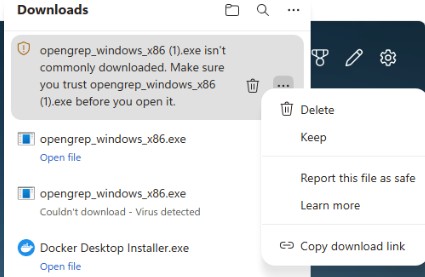
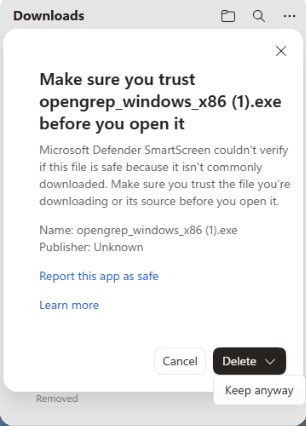
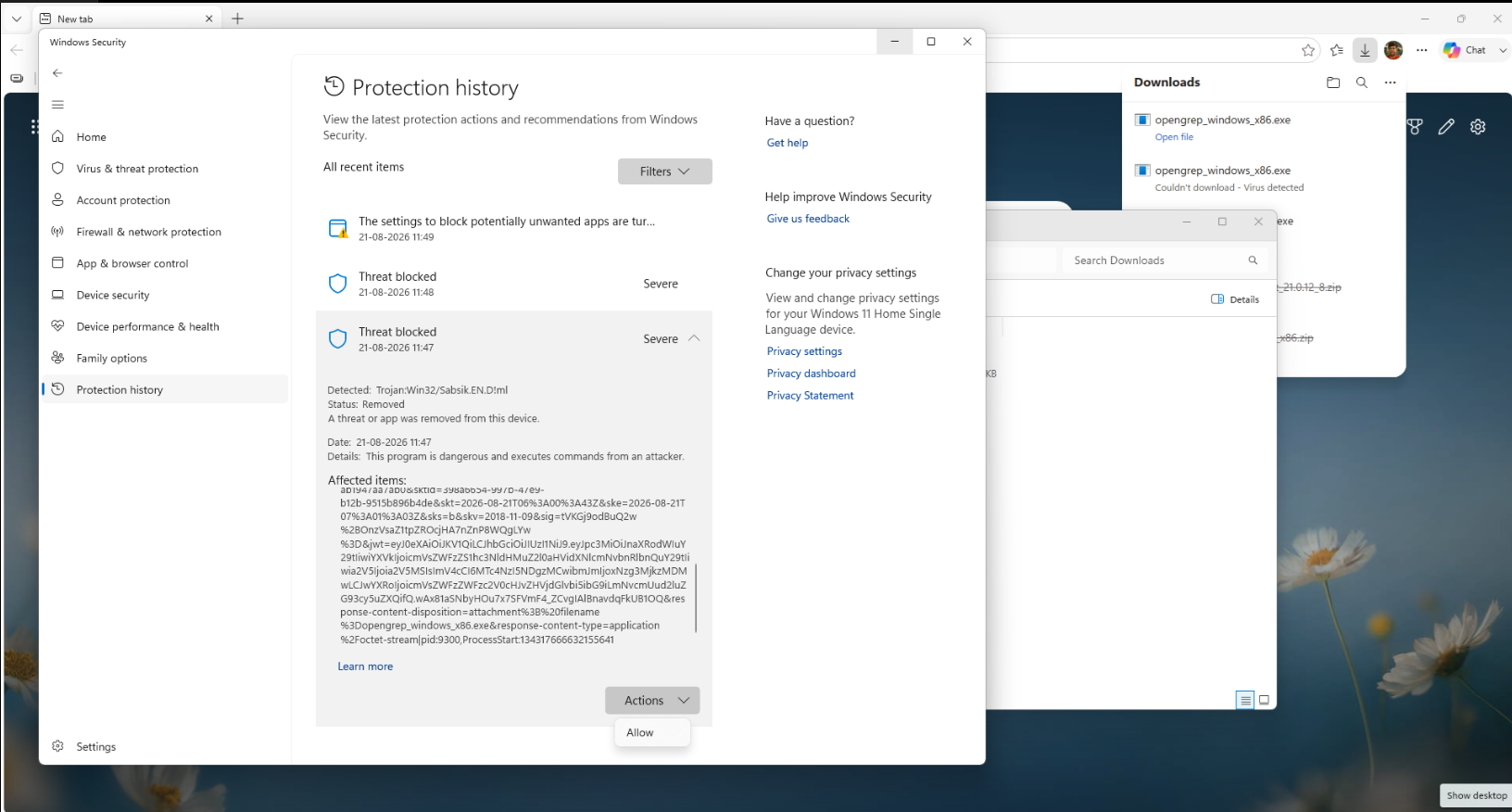
Make sure you trust opengrep_windows_x86.exe before you open itopengrep_windows_x86.exe isn't commonly downloadedCouldn't download - Virus detected- Windows Security Protection history showing Threat blocked
Review the alert through your organization's endpoint-security process before allowing the file:
- In the Edge Downloads panel, identify the warning. A SmartScreen reputation warning usually says opengrep_windows_x86.exe isn't commonly downloaded.
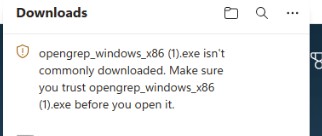
- Open the item menu and choose Keep only after confirming the file came from the documented
OpenGrep
1.26.0release URL on the Prerequisites page or from your organization's approved mirror.
- If Edge shows Make sure you trust opengrep_windows_x86.exe before you open it, compare the file name, architecture, source URL, and your organization's approved hash, software catalog, or mirror evidence. If your policy permits, select Keep anyway.
- If Windows Security shows Threat blocked or Edge reports Couldn't download - Virus detected, open Windows Security > Protection history. If policy permits, use Actions > Allow only for the exact reviewed binary.
- Configure the exact executable path in PostQ CLI, VS Code, or Eclipse, then rerun the prerequisite checker.
Keep endpoint protection enabled. Ask your security team to review an alert that remains unresolved.
Scan appears quiet
Large repositories can spend time in OpenGrep. VS Code and Eclipse show scan progress and heartbeat messages. Check CPU/memory pressure, source size, filesystem performance, and whether the OpenGrep process is still active before terminating it.
If the runner has insufficient memory, scan a representative service or language subtree. A trial license can also reject a repository that exceeds its eligible-file limit.
Reports are empty or incomplete
Check:
- project/source path and read permissions;
- language hint and supported coverage;
- whether OpenGrep completed and produced raw evidence;
manifest.jsoninputs, warnings, and artifact list;opengrep-results/opengrep-results.jsonfor raw matches;- unresolved parameters and unverified library evidence;
- whether the selected source uses APIs covered by the installed release.
An empty report is not proof that the source is crypto-free.
Container volumes fail
- Use absolute host paths on CI runners.
- Create the report directory before the run and confirm it is writable.
- Mount source
:ro, reports:rw, and the license:ro. - Confirm the image architecture matches the runtime VM.
- On Windows/macOS, allow the runtime VM to access the selected drive/folder.
- On SELinux, use the organization-approved labeling option when required.
Do not remove --read-only to solve a report mount error; fix the specific writable report or
temporary mount.
IDE report does not open
- Confirm the scan completed and its report folder still exists.
- Open the PostQ output/console and locate the first error.
- In VS Code, use Show Output and confirm the configured scanner/OpenGrep paths.
- In Eclipse, review Error Log, PostQ console, SWT Browser support, and WebView2 on Windows.
- Load the same folder in the standalone Report Viewer to separate report-data problems from host rendering problems.
Viewer cannot load reports
- Extract the complete viewer archive before opening
index.html. - Use Load Folder for a complete scan directory.
- Confirm PostQ-native JSON is valid and includes
schemaVersion,generatedAt, andscanSession. Forcbom.jsonandresults.sarif, confirm the standard identity fields and metadata/property bag are present. - Do not rename files if a consumer identifies reports by their standard names.
- Avoid combining files from different scan sessions or incompatible schema versions.
Information to collect
Collect product version, operating system/architecture, Java and OpenGrep versions, redacted command
options, exit code, first error identifier, scanner logs, and manifest.json. Share source and raw
reports only through an approved secure support process.